
Real-time browser pitch detection works in a loop: the browser asks for your microphone (getUserMedia), the Web Audio API hands JavaScript the latest few thousand samples, a pitch algorithm such as autocorrelation, YIN or the McLeod method finds the fundamental frequency, and the result is smoothed and turned into a note and cents. It repeats about 60 times a second, entirely on your device.
You can watch this pipeline at work in our free online pitch detector: sing or play one note and the note, frequency and cents appear within a fraction of a second, with no app to install and no audio sent anywhere. This guide explains each step, what it costs in milliseconds, how accurate it can be and what limits it.
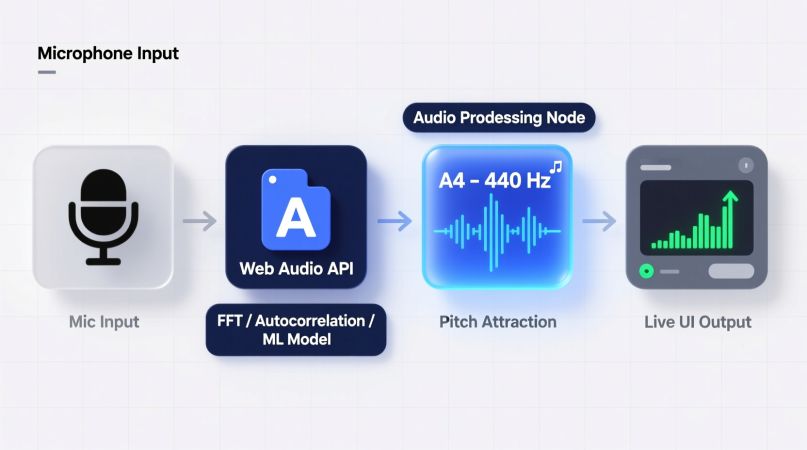
The Real-Time Pitch Detection Pipeline, Step by Step
| Step | Browser feature | What happens |
|---|---|---|
| 1. Capture | navigator.mediaDevices.getUserMedia() | You allow the microphone; the browser opens a live audio stream. |
| 2. Buffer | Web Audio AnalyserNode or AudioWorklet | JavaScript reads the most recent block of samples (the analysis window). |
| 3. Window | A few thousand samples | The window must hold at least two cycles of the lowest note you want to detect. |
| 4. Estimate | Autocorrelation, YIN, McLeod or FFT | The algorithm finds the fundamental frequency (F0) in Hz and a confidence value. |
| 5. Smooth | Noise gate, median filter, octave guard | Weak, noisy or jumpy frames are held back so the display stays steady. |
| 6. Convert | Equal-temperament maths | Hz becomes a note name, octave and cents sharp or flat, then it is drawn on screen. |
1. Capturing the microphone
The browser only opens the microphone after you allow it, and only on a secure (HTTPS) page. A good detector asks the browser to switch off echo cancellation, noise suppression and automatic gain control: those voice-call filters are built for speech, and they can pump the level or smear a sustained note. Our detector turns all three off. Because browsers start audio only after a click or tap, the Start button is also what unlocks the audio engine.
2. Getting the samples: AnalyserNode or AudioWorklet
The stream is connected to an AudioContext, which usually runs at 44.1 or 48 kHz. The simplest design, and the one our homepage detector uses, connects an AnalyserNode and calls getFloatTimeDomainData() once per screen refresh (requestAnimationFrame, about 60 times a second). An AudioWorklet instead runs code on the audio thread in blocks of 128 samples (2.7 ms at 48 kHz), which suits tools that must not miss a single block, such as a recorder. The old ScriptProcessorNode is deprecated.
3. Choosing the analysis window
Pitch is a repeating pattern, so the window must contain at least two full cycles of the lowest note. Longer windows reach lower notes and give steadier readings, but they describe a slightly older moment in time:
| Window (samples) | Length at 48 kHz | Built-in delay (half window) | Two cycles fit down to | Lowest note, roughly |
|---|---|---|---|---|
| 1,024 | 21.3 ms | 10.7 ms | about 94 Hz | G2 (98.0 Hz) |
| 2,048 | 42.7 ms | 21.3 ms | about 47 Hz | G1 (49.0 Hz) |
| 4,096 | 85.3 ms | 42.7 ms | about 23 Hz | A0 (27.5 Hz) and below |
4. Estimating the fundamental frequency
This is the heart of the detector. Real voices and instruments contain many harmonics, and the loudest one is often not the note you hear, so simply picking the biggest peak fails. The common methods are compared below; for the details see autocorrelation vs YIN and how the FFT works in pitch detection.
| Method | How it works | Strengths | Weak spots |
|---|---|---|---|
| Autocorrelation | Compares the signal with delayed copies of itself; the best-matching delay is the period. | Simple, robust for voice and most instruments. | Can lock onto twice the period (an octave too low). |
| YIN (de Cheveigné and Kawahara, 2002) | A difference function with cumulative-mean normalisation and a threshold, then parabolic interpolation. | Fewer octave errors, very accurate on singing. | More work per frame; the threshold needs tuning. |
| McLeod pitch method (McLeod and Wyvill, 2005) | A normalised autocorrelation; it takes the first peak close to the highest one. | Accurate with small windows, gives a clarity score, fast when computed with an FFT. | Still single-note only. |
| FFT peak picking | Finds the strongest frequency in the spectrum. | Fast; ideal for a frequency or spectrum display. | Fooled by strong harmonics and a missing fundamental. |
| Neural networks (e.g. CREPE, 2018) | A trained model predicts pitch from the waveform. | Very robust on difficult voices. | Large downloads and heavy computing for a web page. |
Our detector uses the McLeod method with an FFT-based autocorrelation, parabolic interpolation (so it is not limited to whole-sample delays) and a clarity threshold of 0.6. Machine-learning pitch detection is covered in its own guide.
5. Smoothing and confidence
A raw estimate jumps around on breaths, consonants and note attacks. Real-time tools therefore add a noise gate (ours measures the room for 0.7 s first), a clarity or confidence test, a short median filter over the last few frames (ours uses 5) and an octave guard that holds back a single-frame jump of exactly 12 semitones. Joining those frames into a curve over time is the step from detection to tracking, explained in pitch tracking vs pitch detection.
6. Converting Hz to a note and cents
With A4 = 440 Hz, the note number is n = 69 + 12 × log₂(f ÷ 440); the nearest whole number is the note, and the rest times 100 is the offset in cents (100 cents = one semitone). Example: 445 Hz gives A4 +19.6 cents, a clearly audible sharpness. More on the unit in what cents are in tuning.
How Fast Is It? Latency in Milliseconds
The delay you see is the sum of a few parts. The figures below are for a 48 kHz laptop with a wired or built-in microphone:
| Part of the delay | Typical size | Notes |
|---|---|---|
| Microphone and operating-system input buffer | about 10–20 ms | Bluetooth headsets can add 100 ms or more, and often switch to low-quality call audio. |
| Analysis window (half of 4,096 samples) | about 43 ms | The estimate describes the middle of the window. |
| Pitch calculation | 0.4 ms per frame (our engine) | Measured in our engine tests; slower phones take longer. |
| Screen refresh | up to about 17 ms | One frame at 60 Hz. |
How Accurate Is Browser Pitch Detection?
Accuracy is limited by the algorithm and the input, not by the browser. In our engine tests with steady tones from C2 (65 Hz) to C7 (2,093 Hz), including voice-like tones with a weak fundamental, 484 of 488 readings were within ±3 cents of the true pitch and all were within ±5 cents; with background noise added, 44 of 46 stayed within ±5 cents. Above about 1,800 Hz our accuracy is ±5 cents. Test conditions and the results for every tool are on our methodology page.
In real rooms the microphone matters more than the code: see how microphone quality affects accuracy. Chords, heavy backing music and several voices at once have no single pitch, so a one-note detector may lock onto one note or jump between them.
Privacy: Does the Audio Leave Your Device?
No. In a well-built browser detector the samples stay in memory inside your tab: they are analysed and thrown away. Nothing is recorded or uploaded, and you can confirm it by opening your browser’s developer tools and watching the Network tab while you sing. How we handle audio across the site is documented on our data security page.
Browser Support and Requirements
- Browsers: current Chrome, Edge, Firefox and Safari on desktop, Chrome on Android and Safari on iPhone and iPad all support the microphone and the Web Audio API.
- HTTPS: the microphone is only offered on secure pages.
- Permission: if you blocked the microphone once, re-allow it from the lock or site-settings icon in the address bar.
- Keep the tab visible: browsers pause screen-refresh loops in hidden tabs, and phones may stop the microphone when you switch apps.
Tips for Phones and Tablets
- Check that the microphone works first with our mic test.
- Use the built-in microphone or a wired headset; avoid Bluetooth microphones for tuning.
- Hold the phone 20–40 cm from your mouth or instrument and keep the screen awake.
- Close other apps that use the microphone (calls, voice notes, video chats).
- If readings jump, try a quieter spot: see noise and background interference and why readings become unstable.
Browser Pitch Detector vs a Mobile App
| Browser | App | |
|---|---|---|
| Install and account | None; open the page | Download from an app store |
| Privacy | Audio stays in the tab | Depends on the app’s permissions |
| Latency | About 60–100 ms (wired mic) | Can be a little lower |
| Works in the background or offline | No | Often yes |
| Any device | Yes: laptop, phone, tablet | Per platform |
If you prefer an app, our guide to the best pitch detection apps for iPhone and Android compares the popular ones. To analyse a recording instead of the live microphone, use the audio file pitch detector.
Developer Corner: A Minimal JavaScript Skeleton
async function start() {
  const stream = await navigator.mediaDevices.getUserMedia({
    audio: { echoCancellation: false, noiseSuppression: false, autoGainControl: false }
  });
  const ctx = new AudioContext();                 // create after a click or tap
  const analyser = ctx.createAnalyser();
  analyser.fftSize = 4096;                        // the analysis window
  ctx.createMediaStreamSource(stream).connect(analyser);
  const buf = new Float32Array(analyser.fftSize);
  (function loop() {
    analyser.getFloatTimeDomainData(buf);
    const hz = detectPitch(buf, ctx.sampleRate);  // autocorrelation, YIN or McLeod
    if (hz) show(69 + 12 * Math.log2(hz / 440));  // note number; decimals = cents / 100
    requestAnimationFrame(loop);
  })();
}
FAQ
Why does browser pitch detection sometimes lag?
Usually because of a Bluetooth microphone, a slow or busy device, or a hidden tab. A wired microphone and a visible tab bring the delay down to roughly 60–100 ms.
Why does it show the wrong octave?
Strong harmonics or a weak fundamental can make an algorithm pick double or half the true frequency. Methods such as YIN and McLeod, plus an octave guard, reduce this error but cannot remove it in every case.
Can a browser detector match a hardware tuner?
For steady single notes, yes: in our tests 484 of 488 test tones were within ±3 cents, which is below what most listeners can hear. A noisy room or a poor microphone will cost more accuracy than the browser does.
Does it work offline?
The analysis runs locally, but the page itself has to load first, so you need a connection to open it.
More guides on pitch, tuning and audio analysis are collected in the Knowledge Hub.
Ornella is a music technology writer and vocal tools specialist at Pitch Detector. She creates practical content around pitch detection, note recognition, vocal analysis, and singing education tools for beginners, singers, and audio creators.