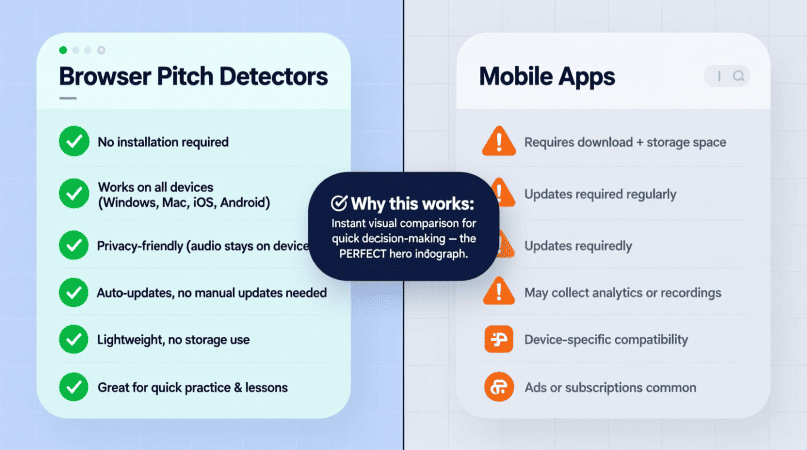
If you’ve been practicing pitch training or tuning your voice, you’ve probably noticed two main options: browser-based pitch detectors and mobile apps. Both can help you check pitch in real time, but the experience is different depending on the platform. Let’s break down the advantages and drawbacks so you can decide which fits your practice style.
Why the Platform Matters
Pitch detection relies on accurate audio input and clear visualization. The platform you choose affects:
- How portable the tool is
- Whether you need internet access
- The type of visuals and accuracy you get
- How the microphone hardware influences results
Browser Pitch Detectors
Pros
- No installation – Just open a page and start detecting pitch instantly.
- Cross-device use – Works on laptops, desktops, and tablets.
- Detailed visuals – Many browser tools, like our real-time pitch detection tool, show spectrograms and precise frequency tracking.
- Automatic updates – Tools stay current without you needing to download anything.
Cons
- Requires internet – Won’t work offline.
- Dependent on browser settings – Accuracy can vary depending on microphone permissions and browser processing.
- Not always mobile-friendly – Some interfaces feel cramped on small screens.
Mobile Pitch Detectors
Pros
- Offline access – Once installed, most apps work without Wi-Fi.
- Portable and quick – Easy to open anywhere, from rehearsal rooms to gigs.
- Touch-optimized interface – Designed for quick, simple feedback.
- Extra features – Many apps include recording, playback, or practice modes.
Cons
- Needs installation – Takes up storage space and requires updates.
- Platform limitations – Some apps only exist on iOS or Android.
- Simpler visuals – Usually limited to a tuner needle or basic waveform.
- Mic dependency – Accuracy depends on the quality of your phone’s built-in mic.
Quick Comparison Table
| Feature | Browser Pitch Detectors | Mobile Pitch Apps |
|---|---|---|
| Installation | None needed | Requires download |
| Offline Use | Needs internet | Works offline |
| Visual Feedback | Detailed (spectrum, cents tracking) | Basic (needle, waveform) |
| Portability | Laptop/Desktop based | Pocket-sized, easy on the go |
| Mic Options | External mics supported | Mostly phone mic, some external support |
| Extra Features | Usually limited to pitch visualization | Recording, practice tools, exercises |
Which Should You Choose?
- For detailed analysis at home → Browser pitch detectors give more visual feedback and work well with external microphones. Try our singing pitch detector for cent-level accuracy.
- For quick checks on the go → Mobile apps are faster and don’t rely on Wi-Fi.
- Many musicians use both: a browser tool for structured training, and a mobile app for portable convenience.
Singers often use this voice testing tool to better understand their vocal span.
FAQs
Q: Are browser detectors more accurate than apps?
Accuracy depends more on the microphone than the platform, but browser tools often provide clearer visuals.
Q: Can mobile apps replace a browser pitch detector?
For portability, yes. But for deep analysis, browsers usually offer more detail.
Q: Do browser pitch detectors work offline?
Not usually. They require internet access to load and process.
Q: Which is better for beginners?
Mobile apps are easier to start with, while browser tools are better for structured training.
Evaluating digital tools is easier once you understand how accurate pitch detectors are.
Many producers still prefer desktop setups with pitch detection software.
Mobile users often check performance using a best pitch detector app.
App readings make more sense when you know what your detector tells you.
Studio workflows benefit from a dedicated audio engineering tool.
Live singers get quick feedback through a singing pitch tool.
Comparing platforms is simpler after reviewing how pitch detection helps production.
PitchDetector.com is a project by Ornella, blending audio engineering and web technology to deliver precise, real-time pitch detection through your browser. Designed for musicians, producers, and learners who want fast, accurate tuning without installing any software.