
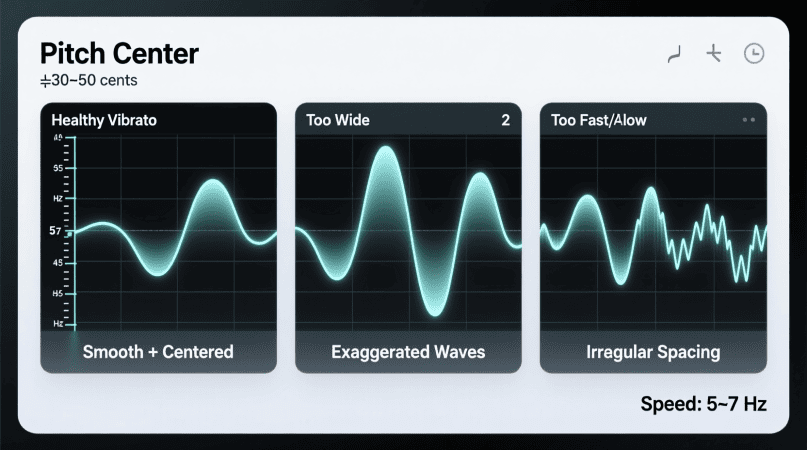
Vibrato adds richness and emotion to your singing — but uncontrolled vibrato can make you sound out of tune. The Voice Pitch Analyzer helps you see and control vibrato with real-time visual feedback.
This guide explains how vibrato works, why pitch stability matters, and how to use the analyzer for better control and accuracy.
What Is Vibrato?
Vibrato is a natural oscillation in pitch, typically centered around a note, creating a warm and expressive tone.
Key vibrato characteristics:
- Speed (rate): How fast the pitch oscillates (5–7 cycles per second is common).
- Width (extent): How far above and below the pitch center the oscillation goes (±20–40¢ is typical).
With the Voice Pitch Analyzer, you can see this oscillation visually in real time.
Why Pitch Stability Matters
A good vibrato:
- Stays centered on the note (around 0¢ deviation).
- Has consistent width and speed.
- Blends smoothly in choir or ensemble settings.
Uncontrolled vibrato can make notes sound sharp, flat, or wobbly, affecting intonation and overall tone quality.
How to Use the Voice Pitch Analyzer for Vibrato Training
- Open the Tool: Voice Pitch Analyzer
- Allow Microphone Access: The tool runs in your browser with no audio uploads.
- Sing a Steady Note: Hold a single note first to establish pitch stability.
- Add Vibrato: Introduce natural vibrato while watching the ±cents reading.
- Analyze:
- Width: How far the pitch moves above/below center.
- Speed: How quickly it oscillates per second.
- Adjust: Aim for even, controlled oscillations around the center pitch.
Vibrato Control Exercises
| Exercise Name | Goal | How to Do It |
|---|---|---|
| Steady → Vibrato | Pitch stability first | Hold a steady note, then add vibrato |
| Slow Vibrato Drill | Even width & timing | Oscillate slowly, keep ±cents balanced |
| Width Control | Reduce excess deviation | Aim for ±20–40¢, avoid going too wide |
| Speed Variation | Expressive flexibility | Try 4, 6, 8 oscillations per second |
| Phrase Vibrato | Musical application | Add vibrato only at phrase endings |
Common Issues & Fixes
- Vibrato too wide? Start with steady notes, slowly reduce ±cents range.
- Speed uneven? Practice with a metronome or steady beat.
- Off-center vibrato? Focus on staying near 0¢ before adding width.
For flicker or instability issues, read Pitch Flicker: 9 Causes & Fixes.
If you’re exploring vocal abilities, you can start with this helpful range calculator tool to get a quick overview.
FAQs
1. How fast should vibrato be?
Typically 5–7 oscillations per second; faster or slower rates may sound unnatural.
2. How wide should vibrato be?
±20–40¢ is common; wider vibrato can sound dramatic but may affect tuning.
3. Can beginners learn vibrato control?
Yes — start with steady notes, add small oscillations, then increase gradually.
4. Does the analyzer work for choir training?
Yes, singers can practice individually for more consistent ensemble vibrato.
Fine control over vibrato starts by checking your output with a real-time pitch tracker.
Identifying small tuning drifts is easier when you run notes through a voice pitch analyzer.
Singers often compare steady tones using a reliable pitch accuracy checker.
Visualizing wobble patterns becomes clearer with the built-in pitch reader.
Subtle pitch movement can be measured more precisely with a frequency detector.
Matching controlled vibrato to a target note is simpler with a note matcher.
To see how vibrato sits across your voice, review the vocal range notes.
PitchDetector.com is a project by Ornella, blending audio engineering and web technology to deliver precise, real-time pitch detection through your browser. Designed for musicians, producers, and learners who want fast, accurate tuning without installing any software.