
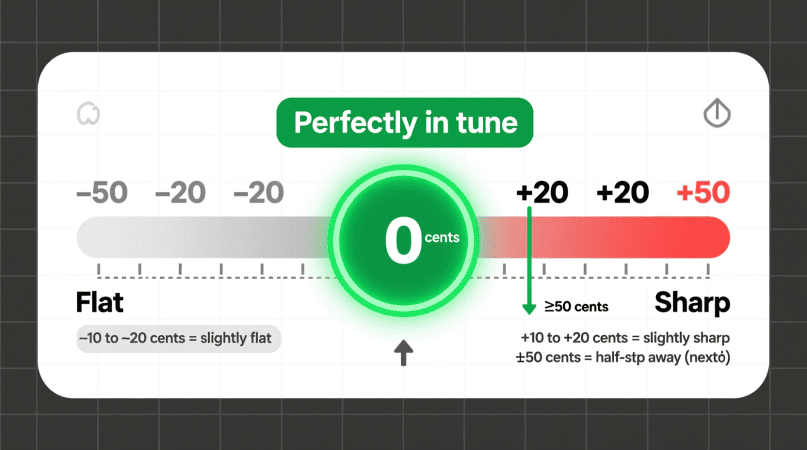
If you’ve used a pitch detector, you’ve seen the ±cents display under the note and frequency. But what do those numbers really mean? And how can you use them to improve your tuning or singing?
This guide explains what ±cents are, how to read them, and practical ways to use them for better accuracy.
What Does ±Cents Mean?
Pitch detectors measure pitch accuracy in cents — tiny units dividing each semitone (the distance between two notes) into 100 equal parts.
- 0¢ = perfectly in tune
- +¢ = sharp (above the target note)
- −¢ = flat (below the target note)
So, if your detector shows A4, +8¢, it means you’re 8 cents sharp — slightly above the ideal frequency.
Quick Reference Table
| ±Cents Reading | Intonation Status | What to Do |
|---|---|---|
| 0–5¢ | Excellent | Keep it steady |
| 6–15¢ | Slightly flat/sharp | Small correction needed |
| 16–30¢ | Off-pitch | Reset, check breath/posture |
| >30¢ | Far off | Re-center before practicing |
How to Use ±Cents in Practice
1. Singing Practice
- Start with single vowels (“ah,” “oo”) for 3–5 seconds.
- Aim for 0–5¢ stability before adding dynamics or vibrato.
- Use the Voice Pitch Analyzer for vocal-specific feedback.
2. Instrument Tuning
- Pluck one string or play one note at a time.
- Adjust tuning pegs until the reading stabilizes near 0¢.
- For quick string-by-string setups, see Instrument Quick Starts.
3. Intonation Training
- Play or sing scales slowly.
- Watch the ±cents drift on each note.
- Over time, your ear learns to center itself naturally.
Common Mistakes to Avoid
- Chords or complex sounds: Pitch detectors work best with single notes.
- Moving notes too quickly: Hold steady for 2–3 seconds to lock the reading.
- Ignoring calibration: Check A4 = 440 Hz vs 442 Hz if needed.
For high-register challenges, read Whistle & High Register Detection Tips for accurate setup advice.
FAQs
1. How accurate is ±cents measurement?
Most detectors read within ±3 cents in quiet conditions with a good mic.
2. Does ±cents replace tuners?
No, it adds detail. Tuners show “in tune/out of tune,” while ±cents show how close.
3. Can I use ±cents for choir tuning?
Yes. Many choirs aim for ±5¢ precision on key notes.
4. Why does ±cents flicker?
Noise, mic issues, or unstable notes cause flicker. See Pitch Flicker Causes & Fixes for solutions.
Learning how the scale works is simpler when you review the A440 tuning standard.
Small tuning errors make more sense after reading about pitch and frequency differences.
Stable meter readings depend on understanding background noise interference.
Seeing how the needle responds becomes clearer with a real-time browser detector.
Improving cent accuracy is easier when you know how calibration works.
Translating meter values is simpler once you learn how to convert frequency to notes.
Mastering precise tuning builds on the basics of a frequency note converter.
PitchDetector.com is a project by Ornella, blending audio engineering and web technology to deliver precise, real-time pitch detection through your browser. Designed for musicians, producers, and learners who want fast, accurate tuning without installing any software.